
TABLE OF CONTENTS
Introduction
The Feefo Social Widget displays real-time, verified reviews and user-generated content (UGC) directly on your website. By integrating this widget, you give visitors immediate access to authentic customer feedback — helping to build trust, boost engagement, and reduce bounce rates.
Prerequisites
-
Access to your website's CMS or its source code.
-
The unique Embed Code provided in your Feefo Social Collection.
- Update Content Security Policy (CSP).
Step-by-Step Installation
-
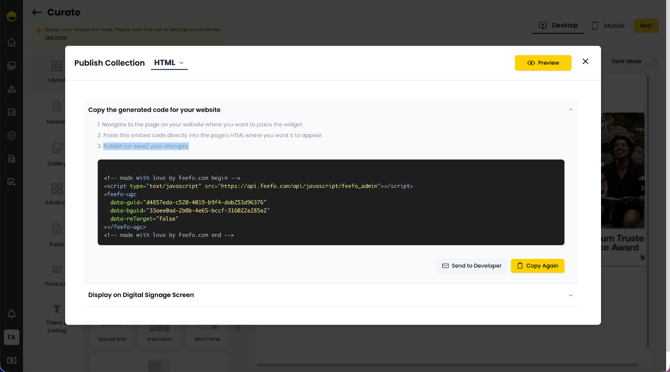
On the Curate page in your Feefo Social Collection, click Next once you have finalised your widget's appearance.
-
Copy the snippet displayed in the code block window.
-
Navigate to the page on your website where you want to place the widget.
-
Paste this embed code directly into the page's HTML where you want it to appear.
- Publish (or save) your changes.
Content Security Policy (CSP)
To ensure your Feefo Social Widget displays correctly and without browser console warnings, update your site’s Content Security Policy (CSP) allowlist to include Feefo's official domains.
If your site uses a Content Security Policy, ask your web developer to add the following Feefo domains to your CSP headers or meta tag content attribute:
script-src:*.feefo.com(Allows Feefo scripts to run)style-src:*.feefo.com(Allows Feefo widget styling and fonts)font-src:fonts.feefo.com(Allows custom Feefo widget fonts)media-src:social-cdn.feefo.com(Allows media and video content)
Why is this needed? Content Security Policies restrict which external resources your website can load. Adding these directives ensures all Feefo fonts, styles, and media load seamlessly without being blocked by the browser.
Summary
You have now installed the Feefo Social Widget on your website. By adding the embed code to your page’s HTML and updating your Content Security Policy, your site will automatically display the latest verified reviews from your Feefo Social Collection. If you experience any issues, check that your CSP directives are correctly configured and contact Feefo Support for further assistance.