
TABLE OF CONTENTS
Introduction
Feefo Forms are designed with a focus on incorporating best practices for Product and Service Feedback.
All our packages include our default questions types:
- Star Rating: A mandatory element for both service and product templates.
- Main Review: Gather in-depth insights with the main review question.
- Media: Encourage customers to share their experiences through multimedia.
For further questions types that can be applied to enhanced accounts, click here.
The merchant logo/image is displayed at the top of the feedback form, as well as within the service section of the feedback form if the service section is included. This image pulls from the Feefo Hub, settings, brand profile, Merchant Logo Image. The image is set for the whole Feefo Hub account, and cannot be set per campaign.
.png?width=151&height=57&name=Tooltip%20(1).png)
How to preview the feedback form
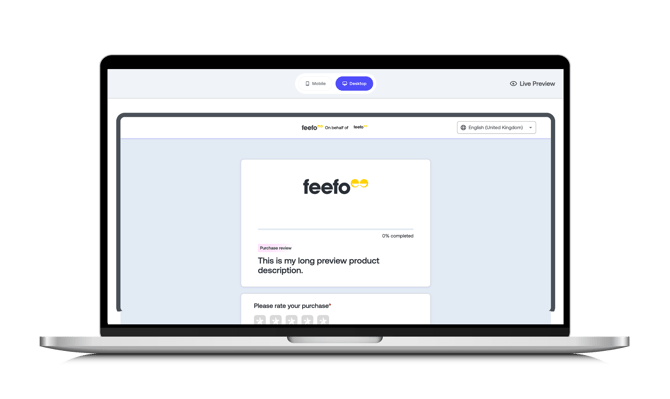
The feedback form, per campaign, can be previewed through the Hub under collection > manage campaigns > edit/actions or feedback preferences > customise form > preview.
Ordering templates
The order in which each section appears in the feedback form can be applied through each campaign within the feedback form builder page. You can choose which section the feedback form goes through, split between product, service, and custom. The order in which each question is asked within each product, service, and custom section can also be chosen within each section.
Language
The form will display a language based on the locale provided in the sale entity. If none is provided, it will fall back to the campaign locale. If no language has been set for the campaign, it will fall back to the merchant locale setting.
Customisation
The ultimate customisation comes in the form of Custom Questions allowing you to extend your forms beyond the basics. Dive deep into customer experiences with options like Net Promoter Score (NPS) or ranking, open text, single or multiple-choice, and product attributes. Support for multiple languages enhances the flexibility of your feedback forms.
Questions can be intelligently linked to tags. Want specific questions for a particular product? Assign a question to a specific SKU, ensuring it appears only when relevant.
Name and location
The feedback form will display an option for the consumer to provide and display their name and location at the end of the first section of the form. This is provided with the Feefo terms, conditions, privacy policy, and moderation guidelines. Regardless of choice, the consumer will need to re-confirm that they agree with the Feefo terms, conditions, privacy policy, and moderation guidelines for each section of the feedback form they with to submit.
Review Booster
Merchants can have a section added to their feedback form where consumers can opt-in to be part of our consumer testing network for Review Booster.
Once enabled, all Product forms will have the Review Booster question added at the bottom of the Product question.
Thank you page
Completion of the new feedback form will lead to the same thank you page with the same functionality as previous iterations of the feedback form.
Summary
Feefo Forms empower you to glean valuable insights from your customers, providing a seamless and highly customisable user experience. Explore the endless possibilities and optimise your feedback collection process with Feefo Forms 2.0 today! Should you have any queries or need assistance, our dedicated support team is just a message away, ready to assist you on your journey to customer feedback excellence.