
Overview
Microsoft Excel is a spreadsheet application that helps you analyse and visualise your data. It supports complex formulas, charts, and pivot tables. Connect Microsoft Excel with Feefo to integrate it with over 600+ apps, including AI tools like ChatGPT and Gemini. Follow the steps below to set it up.
Step-by-step instructions
-
Log in to your Feefo Hub.
-
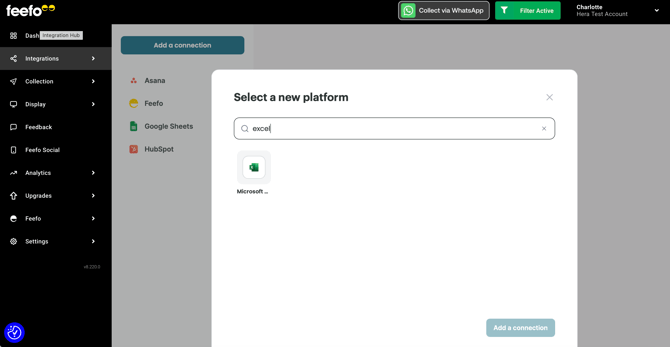
Go to the Integrations tab > Integrations Hub section and click Add a connection.
-
Search for Microsoft Excel, select it, and click Add a connection again.
-
Name your connection.
-
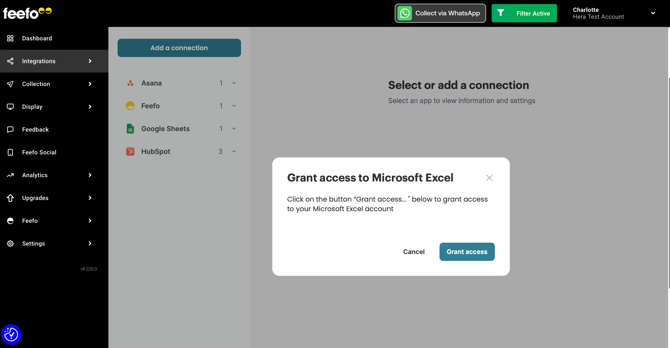
Sign in to your Microsoft account.
-
Then, click Accept to grant Feefo access.
Your connection is ready, and you can now create automations with Feefo and Microsoft Excel.
Due to Excel being a Microsoft product, you may need to approve the requested platform integration. Your Microsoft Admin will be able to do this for you.
If you have any issues, contact support via the live chat on our website.
About Microsoft Excel
Microsoft Excel helps users organize, format, and manipulate data in a spreadsheet.
With it, you can:
-
Create charts, graphs, and other visuals to better understand your data.
-
Build reports, budgets, and invoices with customizable templates.
-
Collaborate on files via OneDrive or SharePoint with the support of Copilot.