TABLE OF CONTENT
Introduction
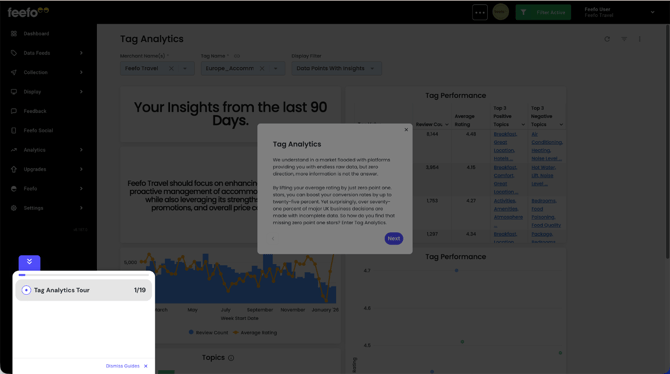
We understand in a market flooded with platforms providing you with endless raw data, but zero direction, more information is not the answer.
By lifting your average rating by just zero point one. stars, you can boost your conversion rates by up to twenty-five percent. Yet surprisingly, over seventy-one percent of major UK business decisions are made with incomplete data. So how do you find that missing zero point one stars? Enter Tag Analytics.
.png?width=151&height=57&name=Tooltip%20(1).png)
What is Tag Analytics?
This is our new AI-powered reporting feature that analyses the tags of your reviews and tells you exactly which topics are dragging down or lifting up your average rating. It creates a prioritised to-do list and takes the guesswork out of your business strategy. So now that we've gone over the basis of why we created this report, we can drill down into the key features, starting with the high-level AI summary.
| Feature | Description | Business Value |
| Operationalised Tags | Transforms your existing merchant-defined tags into relevant topics, complete with AI-generated summaries and suggested actions. | Ensures insights are immediately aligned with your internal business structure (products, branches, etc.). |
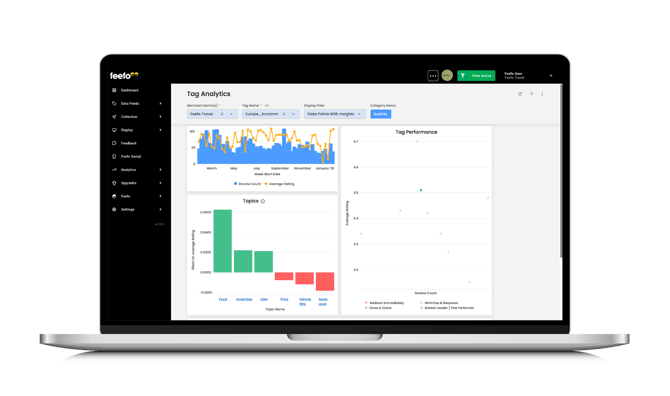
| The Action Matrix (Core Output) | A scatter graph that categorises every tag value point by its Sentiment (average rating) and Volume (mentions) into four critical quadrants: Address Immediately, Maintain & Monitor, Minimise & Reassess, and Grow & Share. |
Prioritises resource allocation by immediately dictating the highest-leverage actions. |
| Direct Rating Impact Quantification | Measures by how much a specific topic is helping or harming your overall average rating. | Provides the evidence necessary to justify major product/service improvements. |
| Actionable Topic Intelligence | AI-powered summaries go beyond identifying trends by providing the prescriptive intelligence needed to pinpoint high-leverage areas for proactive business improvement. | Delivers Faster Time-to-Resolution (TTR) for critical issues and ensures key stakeholders are always informed. |
Where to Find Tag Analytics in the Feefo Hub
-
Go to the 'Analytics Tab'
-
Click 'Advanced Analytics'
Filters
| Field | Description |
| Merchant Name | Your merchant name |
| Tag Name | Use tags to segment your data, whether that's by region, product line, or team. |
| Display Filter | Choose between:
|
Graphs
| Element | Description |
| Time Frame | Standard moving windows of 90, 180, or 365 days. We recommend a window based on your review volume (e.g., 90 days for high volume). |
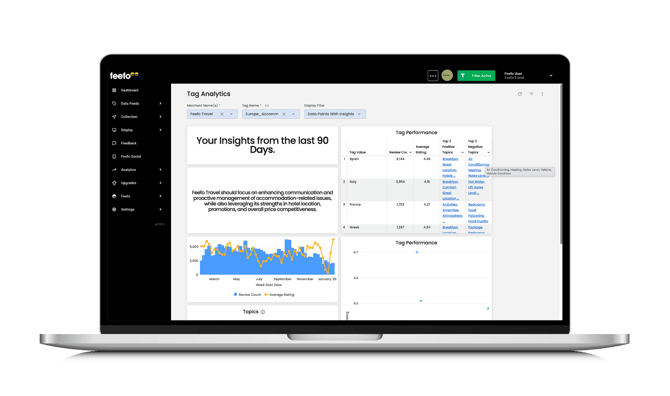
| AI Summary | A holistic, natural language overview of the key findings for the selected tag and time frame. |
| Tag Performance Table | Shows high-level data: Tag Value, Review Count, Average Rating, Top 3 Positive Comments, and Top 3 Negative Comments. You can drill down into more detailed charts from here. |
| Over Time Graph | Tracks Review Count and Average Rating over time to monitor the effectiveness of changes you implement. |
| Topics Table | Lists the Topic Name, its effect on the average rating (quantified impact), and topic mentions (volume). |
| Summaries and Actions Table | Provides the Topic Name, its Impact Rating and Impact value, a detailed Topic Summary, and the recommended Topic Action. |